Rent Register
The Rent Register window allows details to be recorded of any Rents and their payments defined against the Leases on the system.
Facilities > Property and Estates > Rent Register
The link will open the Rent Register grid. It is a grid view which can be searched, sorted and customised as normal.
To add a new Rent Register click New  , to edit an existing Rent Register click Edit
  . A pop up window will appear which will allow the creation or amendment of a Rent Register.
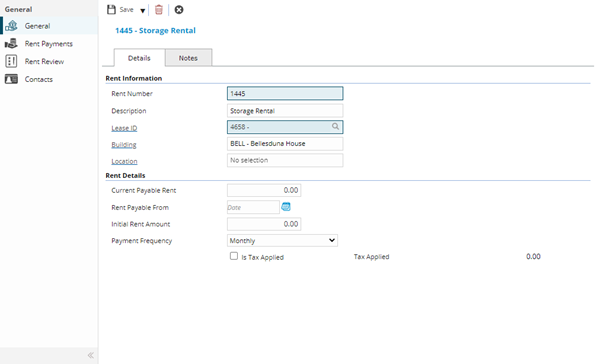
 Click to view - Rent Register Fields and Descriptions
Complete the fields and click Save  . Once the Rent Register header has been completed and saved a sub navigation will appear to allow additional entities to be assigned.
These include:
- Rent Payments
- Rent Review
- Contacts
Rent Payments
Click to view more detail.
All Rent payments can be recorded in the Rent Register.
Facilities > Property and Estates > Rent Register - Rent Payments
The link will open the Rent Register / Rent Payments grid. It is a grid view that can be customised and sorted as normal.
To add a new Rent Payment click New , to edit an existing Rent Payment click Edit . A pop up window will appear which will allow the creation or amendment of a Rent Payment.
Click to view - Rent Payments Fields and Descriptions
Rent Review
Click to view more detail.
Periodically rents are reviewed and changes may be made. The rent review allows this information to be recorded.
Facilities > Property and Estates > Rent Register - Rent Review
The link will open the Rent Register / Rent Review grid. It is a grid view which can be searched, sorted and customised as normal.
To add a new Rent Review click New , to edit an existing Rent Review click Edit . A pop up window will appear which will allow the creation or amendment of a Rent Review.
Click to view - Rent Review Fields and Descriptions
Contacts
Click to view more detail.
Additional contacts can be assigned to the Rent Register, these are assigned from the Contacts lists.
Facilities > Property and Estates > Rent Register - Contacts
The link will open the Rent Register / Contacts grid. It is a grid view which can be searched, sorted and customised as normal.
To assign Contacts click Assign  , entities in the right hand assignment window are connected.
To create Contacts see Contacts
Note: Rent registers can also be created and amended from the Building or Location entity.