Rates Register
Rates Registers are used to record details of any Business Rates paid against Buildings or Locations.
The list of Rates Registers are maintained here.
Facilities > Property and Estates > Rates Register
The link will open the Rates Register grid. It is a grid view which can be searched, sorted and customised as normal.
To add a new Rates Register click New  , to edit an existing Rates Register click Edit
  . A pop up window will appear which will allow the creation or amendment of a Rates Register.
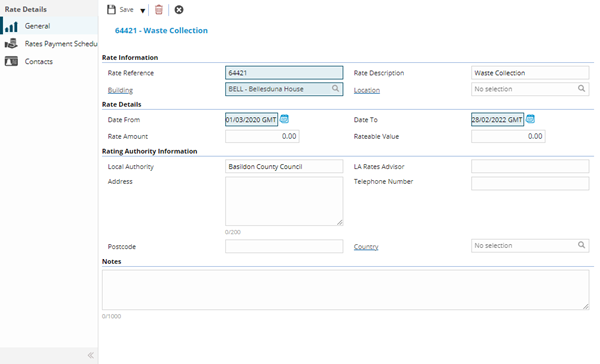
 Click to view - Rates Register Fields and Descriptions
Complete the fields and click Save  . Once the Rates Register header has been completed and saved a sub navigation will appear to allow additional entities to be assigned / created.
These include:
- Rates Payment Schedule
- Contacts
Rates Payment Schedule
Click to view more detail.
If Rates are due to be paid on a schedule the schedule can be recorded here.
Facilities > Property and Estates > Rates Register - Rates Payment Schedule
The link will open the Rates Register / Rates Payment Schedule grid. It is a grid view that can be customised and sorted as normal.
To add a new Rates Payment Schedule click New , to edit an existing Rates Payment Schedule click Edit . A pop up window will appear which will allow the creation or amendment of a Rates Payment Schedule.
Click To view - Rate Payment Schedule Fields and Descriptions
| Field Name | Description |
|---|---|
| Rate Details | |
| Due Date | The date the rates are due. |
| Amount | The cost of the rate due. |
Contacts
Click to view more detail.
Additional contacts can be assigned to the Rates Register, these are connected from the Contacts lists.
Facilities > Property and Estates > Rates Register - Contacts
The link will open the Rates Register / Contacts grid. It is a grid view which can be searched, sorted and customised as normal.
To assign Contacts click Assign  , entities in the right hand assignment window are connected.
To create Contacts see Contacts
Note: Rate registers can also be created and amended from the Building or Location entity.